TG Downloader Chrome Extension Preview
The TG Downloader Chrome extension is in development. Soon, you’ll be able to send videos, images, and files from Telegram Web directly to TG Downloader with a single click—no copying message links required.

TG Downloader already supports downloading individual Telegram messages by link, downloading channel or group history in bulk, and monitoring new messages.
But there’s another common use case:
You don’t want to download everything. You’re simply browsing Telegram and want to save a few specific videos, photos, or files you come across.
That’s exactly what the upcoming TG Downloader Chrome extension is designed for.
Download only what you want while browsing
The idea is simple.
Once the extension is installed, Telegram Web will include a “Download to TG Downloader” action next to supported messages.
When you see something you want to keep, just click it.
Browse Telegram Web
    ↓
Find something worth saving
    ↓
Click “Download to TG Downloader”
    ↓
The task is sent to the desktop app
    ↓
TG Downloader handles the download
No copying message links.
No switching back and forth between Telegram Web and TG Downloader.
Just keep browsing and download the items you actually want.
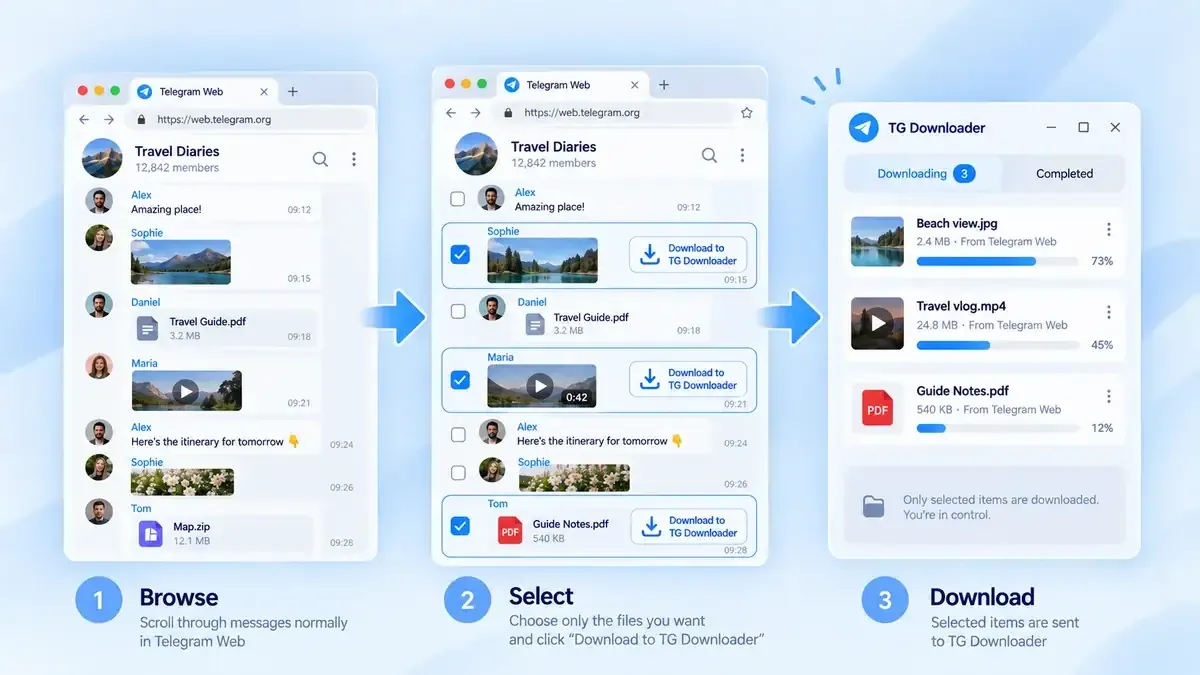
Made for selective downloading
Imagine a channel that posts dozens or even hundreds of messages every day.
You may only want to save two videos and one file.
In that situation, there’s no reason to:
- Download the entire channel
- Monitor every new message
- Copy and paste each message link manually
With the Chrome extension, you’ll simply choose the individual items you want as you browse.
That’s the main purpose of the extension:
Browse normally. Download selectively.
The extension is a shortcut to TG Downloader
The Chrome extension is not intended to become a separate download manager.
Its job is to make TG Downloader easier to access from Telegram Web.
When you click the download button, the selected item is sent to the TG Downloader desktop app, which handles the actual download.
The workflow is straightforward:
Telegram Web
    ↓
Chrome extension
    ↓
TG Downloader
    ↓
Saved locally
So instead of creating a second download system inside the browser, the extension acts as a bridge between Telegram Web and the desktop app.
Keep using Telegram the way you already do
You won’t need to change how you use Telegram Web.
Open a channel.
Scroll through messages.
Watch videos.
View photos.
Check files.
When you find something you want to save, click “Download to TG Downloader.”
That’s it.
You don’t have to decide in advance whether an entire channel should be downloaded, and you don’t need to enable monitoring just to save a few items.
Downloading becomes part of the normal browsing experience.
Multi-account support
Many users work with more than one Telegram account, so account matching is also part of the design.
When possible, the extension will identify which Telegram account is currently being used in Telegram Web and match it with the corresponding account in TG Downloader.
If the required account is not logged in, or does not have access to the selected message, TG Downloader will display an appropriate message instead of silently failing.
The goal is to minimize unnecessary account switching and manual setup.
Privacy and account security
The extension will not ask you to enter your Telegram password.
Its role is limited to passing the download task you selected to the TG Downloader app running on your computer.
The actual download is handled using the Telegram account already signed in to TG Downloader.
The extension also does not bypass Telegram’s access permissions.
If your account cannot access a message, the extension will not provide a way around that restriction.
What if TG Downloader isn’t running?
We also want the extension to provide clear feedback when something goes wrong.
For example, it may notify you when:
- TG Downloader is not installed
- The desktop app is not running
- The required Telegram account is not logged in
- The selected message cannot be accessed
- The task has already been added
- The task was successfully sent to TG Downloader
The goal is simple: when you click the button, you should know what happened.
Development status
The TG Downloader Chrome extension is currently in development.
Before release, we’re still testing:
- Different Telegram Web versions
- Videos, images, files, and other supported message types
- Multi-account matching
- Communication with the TG Downloader desktop app
- Duplicate task handling
- Error and connection states
- Chrome Web Store review and release requirements
The final interface, supported message types, and release timing may change based on testing.
A simpler way to save what matters
The Chrome extension is built around one simple idea:
You’re browsing Telegram, you don’t want everything, and you only want to save the content that matters to you.
Instead of copying links or setting up full-channel downloads, you’ll be able to select exactly what you want and send it straight to TG Downloader.
See something worth keeping?
Click once.
Keep browsing.
Download only what you want.