Download from the message
A download button appears beside supported videos, photos, GIFs, and files.
Free Telegram Web download helper
Save Telegram videos, photos, GIFs, and files while browsing Telegram Web. Select what you want and download with one click.

TG Downloader adds download buttons inside Telegram Web, so you can save videos, images, and files without copying message links or opening another website.
A download button appears beside supported videos, photos, GIFs, and files.
Download one file now or keep saving while you browse. The extension has no daily limit.
Choose several files, preview your selection, and send the batch to TG Downloader Desktop.
Works with chats, groups, and channels your signed-in Telegram account can access.
TG Downloader works directly inside Telegram Web. Instead of copying links to another site, choose the files you want where you already browse and download them in one flow.
When Telegram Web makes a file available to your account, TG Downloader can show a download option beside it. What you can save always follows your Telegram access.
Save supported video posts and shared MP4 files from a message or in a batch.
Save photos, JPGs, PNGs, screenshots, and supported GIFs available in Telegram Web.
Download compatible documents and shared files without leaving the chat.
Choose several videos, images, and files, then let the desktop app download them together.
Download one file from the message, select several files, or let the desktop app handle a large batch.
A download button appears beside supported Telegram Web videos, photos, and files.
No copied links. No extra download site.

Turn on batch mode, choose several videos, photos, and files, then download them as one batch.
Keep choosing files while you browse.

Send selected files from Chrome to TG Downloader Desktop when you need a faster, more stable download.
Batch queues, multi-threaded downloads, and better large-file stability.
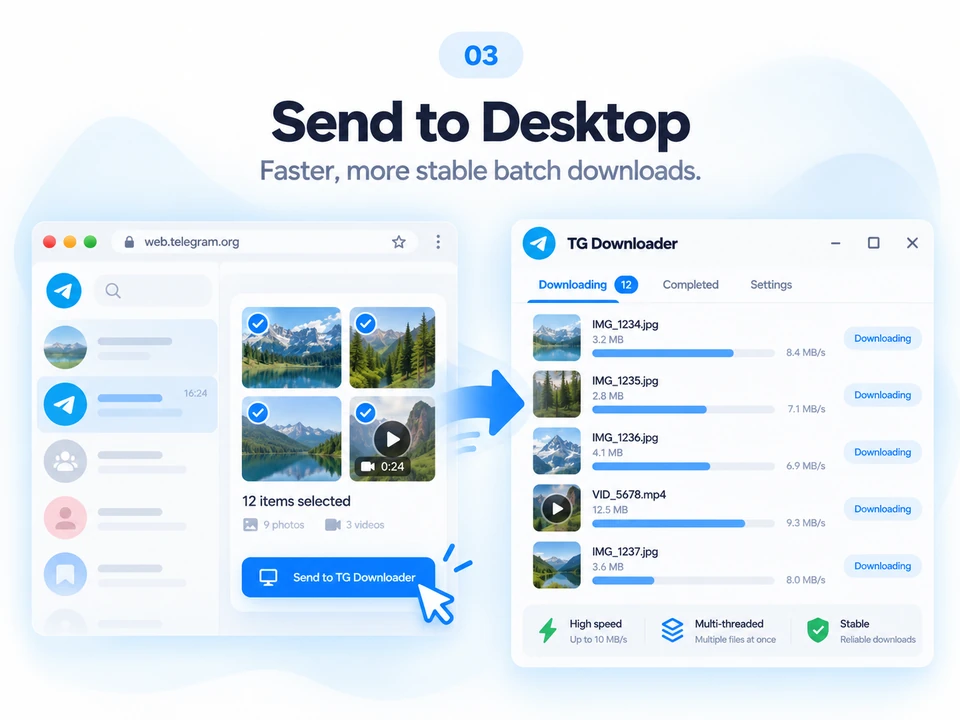
The extension helps you choose files in Telegram Web. TG Downloader Desktop takes over when you have a large batch or large files to download.
Browser extension
Download supported files directly while you browse Telegram Web.
TG Downloader Desktop
Send selected files to TG Downloader Desktop for faster, more stable downloads on your computer.
Answers about downloads, supported files, privacy, and the desktop app.
Still have a question? Contact usYou can save files from chats, groups, and channels your Telegram account can already open. The extension does not bypass Telegram permissions, protected-content settings, or account restrictions.
No. You can download individual files directly in Chrome. Install the desktop app when you want it to handle a batch of files.
No. The extension works with the Telegram Web session already open in your browser.
No. Your files are not routed through our servers. Single downloads use Telegram Web and your browser; batch requests go only to the desktop app on the same computer.
The extension supports Chrome and modern Chromium browsers such as Edge, Brave, and Opera. Telegram Web K and Telegram Web A are both supported.
You can download compatible videos, MP4 clips, photos, images, GIFs, documents, and files that Telegram Web makes available in your signed-in session. Availability can vary by message and Telegram Web.
Refresh Telegram Web, open the file so it can load, and confirm that you are using Telegram Web A or K. A button will not appear for unsupported files or content that Telegram does not make available to your account.
No. TG Downloader does not bypass Telegram login, membership, protected-content settings, or any other access restriction.
No unnecessary re-encoding is performed. The downloaded video quality depends on the version Telegram Web makes available to your current session.
Your Telegram account remains yours. The extension works in your Telegram Web session and does not upload files to a third-party service.
Your files are not routed through TG Downloader servers.
The extension contains no advertising, tracking, or analytics code.
The extension does not read cookies, passwords, or general history.
Batch requests go only to the TG Downloader Desktop app on the same computer.

Add the free TG Downloader Chrome extension and download directly from Telegram Web, without copying links.