Telegram Account List
View Telegram accounts in TG-Downloader, check their status, switch the active download account and remove accounts you no longer use.
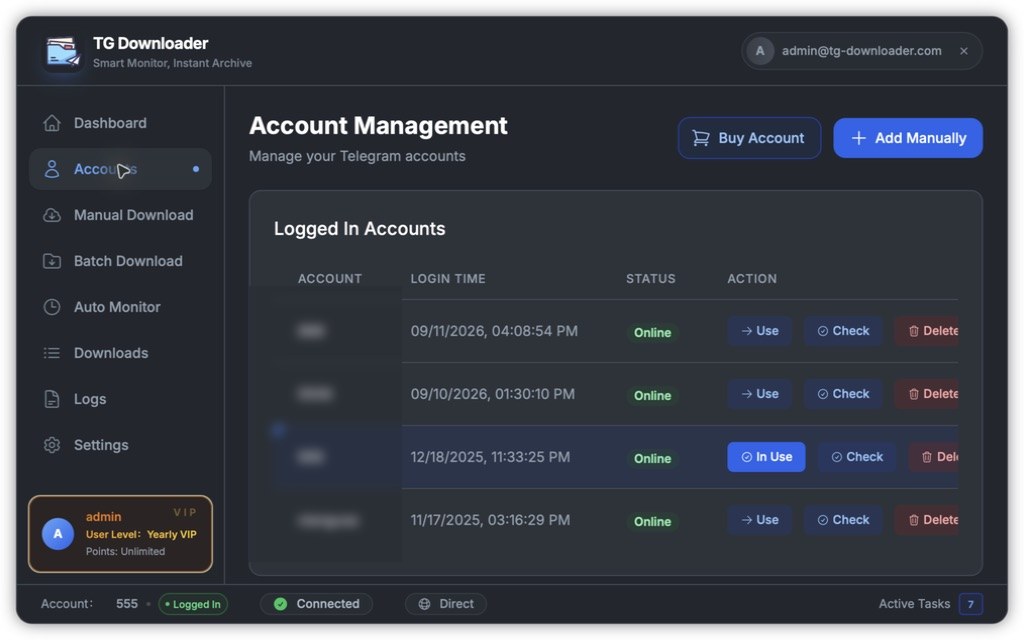
Each row is one Telegram account and has four columns:
| Column | Meaning |
|---|---|
| Account | The namespace chosen when the account was added |
| Login Time | When the account was added |
| Status | Online / Offline / Expired / Checking |
| Action | Use / Check / Delete |
The three actions
- Use: switches the active download account. The active row has a blue marker.
- Check: tests whether the sign-in still works.
- Delete: removes the account and its task records after confirmation.
The top-right buttons are Buy Account and Add Manually. Your plan controls the maximum number of accounts.
See Add a Telegram Account for login options and Switch the Active Account for account binding rules.